- Optical vs. Magnetic
- Max Size
- Sequential vs. Direct Access
- Read Speed
- Portability
Tuesday, 29 March 2011
1.4c Secondary Storage Media
Differences:

1.4b Types of Primary Memory
ROM (Read-only)
RAM (Random Access Memory)
- Holds OS / Data / Programs that are IN USE.

- Non-volatile (Doesn't Change)
RAM
- Volatile (Able to Change)
1.4a Control Unit, Memory Unit, and Arithmetic Logic Unit
Arithmetic Logic Unit:
- Does Maths
- Works out Logic (IF, Else)
- Holds I/O while Control unit decides what to do
Memory Unit (Stores)
- Holds all the instructions to be used
- Holds all the data to be used
Control Unit
- Decides next instruction
- Gets it
- Deciphers it
- Tells the other parts what they need to do.
Sunday, 27 March 2011
1.3j Back up vs Archiving
Backing up
- Store data for current data that may be required data that they are currently need (Short term)
- Backs up data that can be accessed fast
- done as often as possible
- Done less frequency
- Cheaper media
- long term
1.3g Different Storage Types
Saving to serial storage:
Tape
Credit card
Tape
- No storage
- slow to load
- takes to long to find data
- Brilliant for saving
- order that they arrive are saved
- cheapest method of saving
- physical method of storage
- looks whats on the and saves in order
- slows down saving
- much quicker to find data
- Very fast
- Access to data that uses index's through different menus
- On credit card = hashing algorithm
Credit card
- type of card-
- visa
- country
- banks
- branches
- following a hashing algorithm to decide where to store every piece of data is stored in a specific
- If it is not complicated enough it can result in clashes
- Fast
1.3 Fixed length records
Each field limited to:
- Name -
- 255
- Age -
- 8 (Int)
- Price -
- 16 (Dec)
- Boolean -
- 1 bit
1.3 LIFO & FIFO
FIFO:
First In first Out
Queues are tubes
Queue have two pointer, a Head and Tail pointer
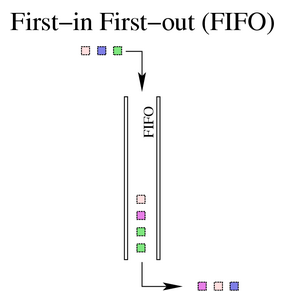
Example:
Print Queue
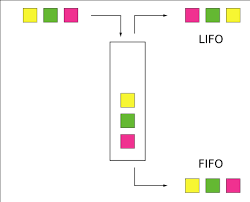
LIFO
Last In First Out
Stack - writes down the return address when a procedure is called
Only one pointer
Example:
stack of paper
First In first Out
Queues are tubes
Queue have two pointer, a Head and Tail pointer
Example:
Print Queue

LIFO
Last In First Out
Stack - writes down the return address when a procedure is called
Only one pointer
Example:
stack of paper
Thursday, 24 March 2011
Wednesday, 16 March 2011
Program 9.4
Program 9.4 has two parts
Public Class Form1
Private Sub btnNewName_Click(ByVal sender As System.Object, ByVal e As System.EventArgs) Handles btnNewName.Click
Dim Name, NewName As String
Name = txtname.Text
NewName = UpperCaseFirstLetter(Name)
lblNewName.Text = NewName
End Sub
End Class
Part to (Module part)
Module Module1
Function UpperCaseFirstLetter(ByVal OldString As String) As String
Dim FirstLetter As Char
Dim NewString As String
FirstLetter = Char.ToUpper(OldString.Substring(0, 1))
Mid(OldString, 1, 1) = FirstLetter
NewString = OldString
Return NewString
End Function
End Module
Public Class Form1
Private Sub btnNewName_Click(ByVal sender As System.Object, ByVal e As System.EventArgs) Handles btnNewName.Click
Dim Name, NewName As String
Name = txtname.Text
NewName = UpperCaseFirstLetter(Name)
lblNewName.Text = NewName
End Sub
End Class
Part to (Module part)
Module Module1
Function UpperCaseFirstLetter(ByVal OldString As String) As String
Dim FirstLetter As Char
Dim NewString As String
FirstLetter = Char.ToUpper(OldString.Substring(0, 1))
Mid(OldString, 1, 1) = FirstLetter
NewString = OldString
Return NewString
End Function
End Module
Program 9.2
Option Strict On
Public Class Form1
Dim Total As Integer
Dim NumberOfMarks As Integer
Private Sub btnOK_Click(ByVal sender As System.Object, ByVal e As System.EventArgs) Handles btnOK.Click
Dim Number As Integer
Number = CInt(txtMark.Text)
lstMarks.Items.Add(Number)
Call ProcessOneNumber(Number, Total, NumberOfMarks)
btnShowMean.Enabled = True
txtMark.Text = ""
txtMark.Focus()
End Sub
Private Sub btnShowMean_Click(ByVal sender As System.Object, ByVal e As System.EventArgs) Handles btnShowMean.Click
Dim Mean As Double
Call Calcmean(Total, NumberOfMarks, CSng(Mean))
txtMean.Text = CStr(Mean)
txtMean.Visible = True
lblMean.Visible = True
txtMark.Enabled = False
btnOK.Enabled = False
End Sub
Private Sub btnQuit_Click(ByVal sender As System.Object, ByVal e As System.EventArgs) Handles btnQuit.Click
Me.Close()
End Sub
Private Sub txtMark_TextChanged(ByVal sender As System.Object, ByVal e As System.EventArgs) Handles txtMark.TextChanged
btnOK.Enabled = True
End Sub
Sub ProcessOneNumber(ByVal ExamMark As Integer, ByRef MarksTotal As Integer, ByRef CountOfMarks As Integer)
MarksTotal = MarksTotal + ExamMark
CountOfMarks = CountOfMarks + 1
End Sub
Sub Calcmean(ByVal MarksTotal As Integer, ByVal CountOfMarks As Integer, ByRef Average As Single)
Average = CSng(MarksTotal / CountOfMarks)
End Sub
End Class
Public Class Form1
Dim Total As Integer
Dim NumberOfMarks As Integer
Private Sub btnOK_Click(ByVal sender As System.Object, ByVal e As System.EventArgs) Handles btnOK.Click
Dim Number As Integer
Number = CInt(txtMark.Text)
lstMarks.Items.Add(Number)
Call ProcessOneNumber(Number, Total, NumberOfMarks)
btnShowMean.Enabled = True
txtMark.Text = ""
txtMark.Focus()
End Sub
Private Sub btnShowMean_Click(ByVal sender As System.Object, ByVal e As System.EventArgs) Handles btnShowMean.Click
Dim Mean As Double
Call Calcmean(Total, NumberOfMarks, CSng(Mean))
txtMean.Text = CStr(Mean)
txtMean.Visible = True
lblMean.Visible = True
txtMark.Enabled = False
btnOK.Enabled = False
End Sub
Private Sub btnQuit_Click(ByVal sender As System.Object, ByVal e As System.EventArgs) Handles btnQuit.Click
Me.Close()
End Sub
Private Sub txtMark_TextChanged(ByVal sender As System.Object, ByVal e As System.EventArgs) Handles txtMark.TextChanged
btnOK.Enabled = True
End Sub
Sub ProcessOneNumber(ByVal ExamMark As Integer, ByRef MarksTotal As Integer, ByRef CountOfMarks As Integer)
MarksTotal = MarksTotal + ExamMark
CountOfMarks = CountOfMarks + 1
End Sub
Sub Calcmean(ByVal MarksTotal As Integer, ByVal CountOfMarks As Integer, ByRef Average As Single)
Average = CSng(MarksTotal / CountOfMarks)
End Sub
End Class
Program 9.3
Public Class Form1
Private Sub btnCalcInterest_Click(ByVal sender As System.Object, ByVal e As System.EventArgs) Handles btnCalcInterest.Click
Dim Interest, AmountInvested As Decimal
Dim RateOfInterest As Single
Dim Years As Short
AmountInvested = txtamountinvested.text
RateOfInterest = txtInterestRate.Text
Years = txtYears.Text
Interest = CalculateInterest(AmountInvested, RateOfInterest, Years)
lblinterestrate.Text = Format(Interest, "Currency")
End Sub
Function CalculateInterest(ByVal Principal As Decimal, ByVal InterestRate As Single, ByVal numberYears As Short) As Decimal
Dim Interest As Decimal
Dim Year As Short
Interest = 0
For Year = 1 To numberYears
Interest = Interest + ((Principal + Interest) * InterestRate / 100)
Next Year
Return Interest
CalculateInterest = Interest
End Function
End Class
Private Sub btnCalcInterest_Click(ByVal sender As System.Object, ByVal e As System.EventArgs) Handles btnCalcInterest.Click
Dim Interest, AmountInvested As Decimal
Dim RateOfInterest As Single
Dim Years As Short
AmountInvested = txtamountinvested.text
RateOfInterest = txtInterestRate.Text
Years = txtYears.Text
Interest = CalculateInterest(AmountInvested, RateOfInterest, Years)
lblinterestrate.Text = Format(Interest, "Currency")
End Sub
Function CalculateInterest(ByVal Principal As Decimal, ByVal InterestRate As Single, ByVal numberYears As Short) As Decimal
Dim Interest As Decimal
Dim Year As Short
Interest = 0
For Year = 1 To numberYears
Interest = Interest + ((Principal + Interest) * InterestRate / 100)
Next Year
Return Interest
CalculateInterest = Interest
End Function
End Class
Tuesday, 15 March 2011
Program 9.1
Public Class Form1
Private Sub hsbRed_Scroll(ByVal sender As System.Object, ByVal e As System.Windows.Forms.ScrollEventArgs) Handles hsbRed.ScrollMe.BackColor = ColorTranslator.FromOle(RGB(hsbRed.Value, hsbGreen.Value, hsbBlue().Value))End Sub
Private Sub hsbGreen_Scroll(ByVal sender As System.Object, ByVal e As System.Windows.Forms.ScrollEventArgs) Handles hsbGreen.ScrollMe.BackColor = ColorTranslator.FromOle(RGB(hsbRed.Value, hsbGreen.Value, hsbBlue().Value))End Sub
EndPrivate Sub hsbBlue_Scroll(ByVal sender As System.Object, ByVal e As System.Windows.Forms.ScrollEventArgs) Handles hsbBlue.ScrollMe.BackColor = ColorTranslator.FromOle(RGB(hsbRed.Value, hsbGreen.Value, hsbBlue().Value))End Sub Class
Private Sub hsbRed_Scroll(ByVal sender As System.Object, ByVal e As System.Windows.Forms.ScrollEventArgs) Handles hsbRed.ScrollMe.BackColor = ColorTranslator.FromOle(RGB(hsbRed.Value, hsbGreen.Value, hsbBlue().Value))End Sub
Private Sub hsbGreen_Scroll(ByVal sender As System.Object, ByVal e As System.Windows.Forms.ScrollEventArgs) Handles hsbGreen.ScrollMe.BackColor = ColorTranslator.FromOle(RGB(hsbRed.Value, hsbGreen.Value, hsbBlue().Value))End Sub
EndPrivate Sub hsbBlue_Scroll(ByVal sender As System.Object, ByVal e As System.Windows.Forms.ScrollEventArgs) Handles hsbBlue.ScrollMe.BackColor = ColorTranslator.FromOle(RGB(hsbRed.Value, hsbGreen.Value, hsbBlue().Value))End Sub Class
Sunday, 13 March 2011
Procedures and Functions
A function is a set of commands which return a value. For example, if we had a function called “add” and passed it two “parameters” ‘a’ and ‘b’ and it added ‘a’ and ‘b’ together, then the value it returned would be “a + b” and we could write our function something like:
add(a, b) {
total = a + b;
return total;
}
What is a procedure?
A procedure could be considered as something which is a set of commands which do not return a value.
The easiest way to think of a procedure is it is a “doing” thing and a function is a “calculating” thing. For example:
procedure open_door(door_id, angle_to_open) {
start_door_opener(door_id);
while (find_open_angle(door_id) < angle_to_open) {
continue_opening(door_id)
}
stop_door_opening(door_id);
}
So, we have a procedure which opens a door. It doesn’t “return a value”, because it is doing something. We pass it 2 parameters
the ID of the door to open door_id2. how far to open the door. angle_to_openThe procedure then starts opening the door, and continues to open the door while the function “find_open_angle” is less than the requested “angle_to_open”.
add(a, b) {
total = a + b;
return total;
}
What is a procedure?
A procedure could be considered as something which is a set of commands which do not return a value.
The easiest way to think of a procedure is it is a “doing” thing and a function is a “calculating” thing. For example:
procedure open_door(door_id, angle_to_open) {
start_door_opener(door_id);
while (find_open_angle(door_id) < angle_to_open) {
continue_opening(door_id)
}
stop_door_opening(door_id);
}
So, we have a procedure which opens a door. It doesn’t “return a value”, because it is doing something. We pass it 2 parameters
the ID of the door to open door_id2. how far to open the door. angle_to_openThe procedure then starts opening the door, and continues to open the door while the function “find_open_angle” is less than the requested “angle_to_open”.
Saturday, 12 March 2011
What are WIKI'"s, Blog's, Micro Blog's and RSS
Wiki: A web-based mechanism to store information, it can be edited by many different users (sometimes using an authorisation system). The best example is http://www.wikipedia.org/
Blog: A web-based mechanism to allow an open discussion on a topic. http://www.farq.co.nz/ (for a laugh!) Alternatively, you could try a more traditional blog site e.g. http://transportblog.co.nz/
Micro blogging: Similar to a Blog, except the comments are usually smallier in size. An example would be http://twitter.com/
RSS: “Real Simple Syndication”. It is a format used to disseminate information in a standard way. It is based on XML. Most news websites have RSS feeds available, e.g. http://snowreports.co.nz/syndication/xml/allfields_brief.cfm
Blog: A web-based mechanism to allow an open discussion on a topic. http://www.farq.co.nz/ (for a laugh!) Alternatively, you could try a more traditional blog site e.g. http://transportblog.co.nz/
Micro blogging: Similar to a Blog, except the comments are usually smallier in size. An example would be http://twitter.com/
RSS: “Real Simple Syndication”. It is a format used to disseminate information in a standard way. It is based on XML. Most news websites have RSS feeds available, e.g. http://snowreports.co.nz/syndication/xml/allfields_brief.cfm
Thursday, 10 March 2011
Prep
Name example
how does it work? RE: people and info
an example of how it can be used and who uses it
wiki
blog
microblogging
RSS
how does it work? RE: people and info
an example of how it can be used and who uses it
wiki
blog
microblogging
RSS
Wednesday, 2 March 2011
Hardware Software
Everything that happens in a computer goes from:
Input - Processor - Output
//
Storage
The CPU infact does not connect directly with the hard drive but instead with the RAM stick. As trying to connect the CPU to hard drive is like talking to someone from a jet plane to a bike.
Software:
Software = sets of instructions which tell the system how to do something. These instructions are collected together in a workable group which is called a program.
Input - Processor - Output
//
Storage
The CPU infact does not connect directly with the hard drive but instead with the RAM stick. As trying to connect the CPU to hard drive is like talking to someone from a jet plane to a bike.
Software:
Software = sets of instructions which tell the system how to do something. These instructions are collected together in a workable group which is called a program.
Operating system
- User interface software
- Provides a GUI
- Provides a Platform for apps top go on it
- Middle ,am between apps and hardware i.e. Word does not know anything about printers but OS does.
- translate software (TS)
- An OS provides its own TS
- Translate high level language into Machine 'Code' - Source code to the object code
- Untilities
- Allows you to change the system to a certain extent
- Applications
- Common Applications (Any app that is used around the world
- iPhoto
- MYOB
- Genetic Applications (Any piece of software that is used for multiple applications)
- Word
- Power Point
- Custom Software (unique, it is only written for a unique task)
- Off the Shelf Software (bought from a shop)
- Downside
- Paying for all the software you don't use
Subscribe to:
Posts (Atom)